<?xml version="1.0" encoding="utf-8"?><feed xmlns="http://www.w3.org/2005/Atom" ><generator uri="https://jekyllrb.com/" version="3.10.0">Jekyll</generator><link href="https://dancocos.com/feed.xml" rel="self" type="application/atom+xml" /><link href="https://dancocos.com/" rel="alternate" type="text/html" /><updated>2026-07-31T14:31:51+00:00</updated><id>https://dancocos.com/feed.xml</id><title type="html">Dan Cocos - Tech Leadership</title><subtitle></subtitle><entry><title type="html">AI Generated Code is Like an Offshore Team</title><link href="https://dancocos.com/2026/04/16/ai-generated-code-is-like-an-offshore-team.html" rel="alternate" type="text/html" title="AI Generated Code is Like an Offshore Team" /><published>2026-04-16T07:00:00+00:00</published><updated>2026-04-16T07:00:00+00:00</updated><id>https://dancocos.com/2026/04/16/ai-generated-code-is-like-an-offshore-team</id><content type="html" xml:base="https://dancocos.com/2026/04/16/ai-generated-code-is-like-an-offshore-team.html"><![CDATA[<p>*Note this isn’t intended to drag on offshore teams. I’ve worked with many of them, with varying levels of quality and success, over my career.</p>

<p>I’ve been reading a lot of well-informed and skeptical posts about AI and where it will play a part in the near and distant future. It’s a long read, but I’ve really enjoyed <a href="https://aphyr.com/posts/411-the-future-of-everything-is-lies-i-guess">The Future of Everything is Lies, I Guess</a>. One of the points it makes is that AI essentially is just putting a bunch of tokens together in a way that sounds like it makes sense, and it never actually does any real thinking. This reminded me of a role where I worked with an offshore dev team, and the quality of code we got from them was usually pretty good, but you often had to guide them in the right direction.</p>

<p>I mentioned there were several examples of numbers being used with no real context for what they meant.</p>

<div class="language-java highlighter-rouge"><div class="highlight"><pre class="highlight"><code><span class="k">for</span> <span class="o">(</span><span class="kt">int</span> <span class="n">i</span> <span class="o">=</span> <span class="mi">1</span><span class="o">;</span> <span class="n">i</span> <span class="o">&lt;=</span> <span class="mi">5</span><span class="o">;</span> <span class="n">i</span><span class="o">++)</span> <span class="o">{</span>
    <span class="c1">//Do something</span>
<span class="o">}</span>

<span class="k">if</span> <span class="o">(</span><span class="n">i</span> <span class="o">&lt;</span> <span class="mi">10</span><span class="o">)</span> <span class="o">{</span>
    <span class="c1">//Do something</span>
    <span class="o">}</span>
</code></pre></div></div>

<p>I brought up on the call that we shouldn’t have numbers like <code class="language-plaintext highlighter-rouge">5</code> or <code class="language-plaintext highlighter-rouge">10</code> just sitting around; it should be a named variable. I was expecting</p>

<div class="language-java highlighter-rouge"><div class="highlight"><pre class="highlight"><code><span class="kd">final</span> <span class="kt">int</span> <span class="no">NUMBER_OF_RESULTS_PER_PAGE</span> <span class="o">=</span> <span class="mi">5</span><span class="o">;</span>
<span class="kd">final</span> <span class="kt">int</span> <span class="no">MAX_NUMBER_OF_RETRIES</span> <span class="o">=</span> <span class="mi">10</span><span class="o">;</span>
</code></pre></div></div>

<p>I looked at the code a few days later and saw this:</p>

<div class="language-java highlighter-rouge"><div class="highlight"><pre class="highlight"><code><span class="kd">final</span> <span class="kt">int</span> <span class="no">ONE</span> <span class="o">=</span> <span class="mi">1</span><span class="o">;</span>
<span class="kd">final</span> <span class="kt">int</span> <span class="no">TWO</span> <span class="o">=</span> <span class="mi">2</span><span class="o">;</span>
<span class="kd">final</span> <span class="kt">int</span> <span class="no">THREE</span> <span class="o">=</span> <span class="mi">3</span><span class="o">;</span>
<span class="kd">final</span> <span class="kt">int</span> <span class="no">FOUR</span> <span class="o">=</span> <span class="mi">4</span><span class="o">;</span>
<span class="kd">final</span> <span class="kt">int</span> <span class="no">FIVE</span> <span class="o">=</span> <span class="mi">5</span><span class="o">;</span>
<span class="kd">final</span> <span class="kt">int</span> <span class="no">SIX</span> <span class="o">=</span> <span class="mi">6</span><span class="o">;</span>
<span class="kd">final</span> <span class="kt">int</span> <span class="no">SEVEN</span> <span class="o">=</span> <span class="mi">7</span><span class="o">;</span>
<span class="kd">final</span> <span class="kt">int</span> <span class="no">EIGHT</span> <span class="o">=</span> <span class="mi">8</span><span class="o">;</span>
<span class="kd">final</span> <span class="kt">int</span> <span class="no">NINE</span> <span class="o">=</span> <span class="mi">9</span><span class="o">;</span>
<span class="kd">final</span> <span class="kt">int</span> <span class="no">TEN</span> <span class="o">=</span> <span class="mi">10</span><span class="o">;</span>
</code></pre></div></div>

<p>Sigh, this wasn’t a case of malicious compliance, and they did technically do what I’d asked. This result, though, is something that I’d expect from a vibe coding tool.</p>]]></content><author><name></name></author><category term="ai" /><category term="conjecture" /><summary type="html"><![CDATA[*Note this isn’t intended to drag on offshore teams. I’ve worked with many of them, with varying levels of quality and success, over my career.]]></summary></entry><entry><title type="html">Tailscale Service Jellyfin Proxy</title><link href="https://dancocos.com/2026/01/24/jellyfin-tailscale-service-proxy.html" rel="alternate" type="text/html" title="Tailscale Service Jellyfin Proxy" /><published>2026-01-24T07:00:00+00:00</published><updated>2026-01-24T07:00:00+00:00</updated><id>https://dancocos.com/2026/01/24/jellyfin-tailscale-service-proxy</id><content type="html" xml:base="https://dancocos.com/2026/01/24/jellyfin-tailscale-service-proxy.html"><![CDATA[<blockquote>
  <p>If you want to securely watch video content served by Jellyfish over a Tailscale machine read on.</p>
</blockquote>

<p>If it isn’t clear already I love <a href="https://tailscale.com/">Tailscale</a> I setup a <a href="https://jellyfin.org">Jellyfin</a> server on my home network, <a href="/2025/02/02/jellyfin-ssl-tailscale.html">read about setting up ssl</a>, the server running Jellyfin has a few other services running as well so Jellyfin is on port 8920 it’s annoying to have add a port to a URL and when serving up “family videos” to friends and family it’s a step beyond what they would think is reasonable. In comes Tailscale services.</p>

<p>First create a <a href="https://login.tailscale.com/admin/acls/visual/tags">tag</a> for this service. I named mine “jellyfin” you can assign a Tag Owner and description if you’d like.</p>

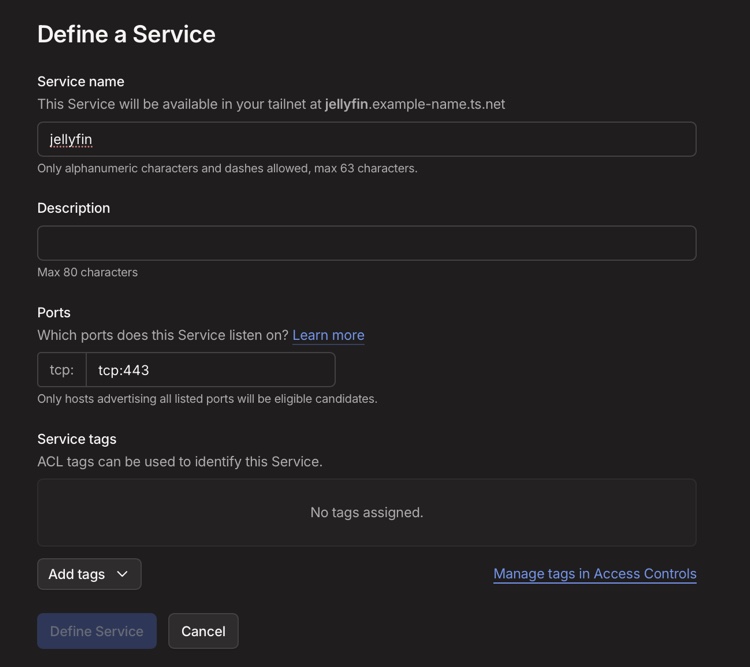
<p>Next <a href="https://login.tailscale.com/admin/services/new">define a service</a>. I also named this “jellyfin” this name is what how you’ll access it in your browser https://jellyfin.name-example.ts.net/</p>

<p>Note the port should be 443 this is the port the TS service uses <strong>NOT</strong> the port you’re serving on your instance.
<img src="/images/jellyfin-service.jpeg" alt="define a service" /></p>

<p>Add the tag jellyfin as well.</p>

<p>Also add the tag jellyfin to the machine.</p>

<p>Now ssh into the instance running jellyfin <code class="language-plaintext highlighter-rouge">sudo -i</code> and run the following 
<code class="language-plaintext highlighter-rouge">tailscale serve --service=svc:jellyfin -https=443 https://myserver.example-name.ts.net:8920</code></p>

<p>You should see something like this:</p>
<div class="language-plaintext highlighter-rouge"><div class="highlight"><pre class="highlight"><code>root@myserver:~# tailscale serve --service=svc:jellyfin -https=443 https://myserver.example-name.ts.net:8920
Available within your tailnet:

https://jellyfin.example-name.ts.net/
|-- proxy https://myserver.example-name.ts.net:8920

Serve started and running in the background.
To disable the proxy, run: tailscale serve --service=svc:jellyfin --https=443 off
To remove config for the service, run: tailscale serve clear svc:jellyfin
</code></pre></div></div>

<p>Open a browser and go to https://jellyfin.example-name.ts.net/ all done.</p>

<div class="tenor-gif-embed" data-postid="9978646096663271619" data-share-method="host" data-aspect-ratio="1" data-width="50%"><a href="https://tenor.com/view/shimmy-annie-murphy-alexis-alexis-rose-schitts-creek-gif-9978646096663271619">Shimmy Annie Murphy GIF</a>from <a href="https://tenor.com/search/shimmy-gifs">Shimmy GIFs</a></div>
<script type="text/javascript" async="" src="https://tenor.com/embed.js"></script>]]></content><author><name></name></author><category term="security" /><category term="configuration" /><category term="dns" /><category term="privacy" /><category term="tailscale" /><summary type="html"><![CDATA[If you want to securely watch video content served by Jellyfish over a Tailscale machine read on.]]></summary></entry><entry><title type="html">Browser Profiles for Fun and Profit</title><link href="https://dancocos.com/2025/11/11/Browser-profiles-for-fun-and-profit.html" rel="alternate" type="text/html" title="Browser Profiles for Fun and Profit" /><published>2025-11-11T07:00:00+00:00</published><updated>2025-11-11T07:00:00+00:00</updated><id>https://dancocos.com/2025/11/11/Browser-profiles-for-fun-and-profit</id><content type="html" xml:base="https://dancocos.com/2025/11/11/Browser-profiles-for-fun-and-profit.html"><![CDATA[<p>There are a handful of browser extensions that will give you cash back when you make purchases. The trade-off is that the extension follows you around the web all day, tracking your every move, not what I really want. Add into this that I use a <a href="https://pi-hole.net">Pi-hole</a> that has pretty aggressive ad blocking turned on, and it breaks a lot of things.</p>

<h1 id="what-i-tried">What I tried</h1>
<ul>
  <li>Chrome Profiles didn’t work because while you can have the browser source DNS from a different source, this changes it across all profiles.</li>
  <li>Safari “Put App in the Dock” (not sure of the official name) didn’t work because you lose the URL bar.</li>
</ul>

<h1 id="solution">Solution</h1>
<p>Firefox profiles allow you to set DNS lookups per profile, so I have one named “Shopping” that has the shopping extensions installed and uses Cloudflare DNS, and when I want to buy something online, I use that browser to get the cashback while avoiding tracking and having to disable add blocking on the Pi-hole. The only problem I’ve noticed so far is that Apple Pay is hit or miss.</p>

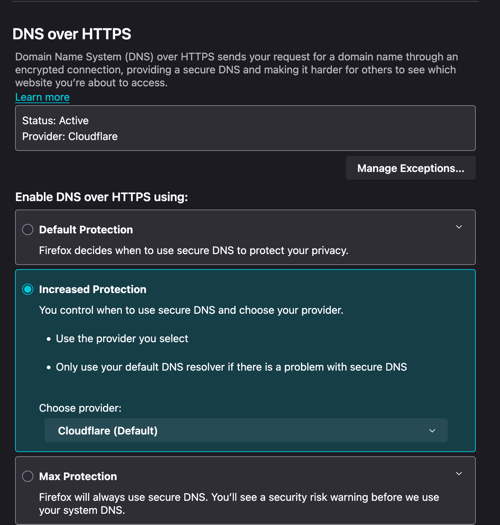
<p>To set it up in Firefox put about:preferences#privacy in the URL bar. Scroll down to DNS over HTTPS, select “Increased Protection” and chose a provider.</p>

<p><img src="/images/firefox-dns.png" alt="Firefox DNS over HTTPS settings" /></p>]]></content><author><name></name></author><category term="security" /><category term="configuration" /><category term="dns" /><category term="privacy" /><summary type="html"><![CDATA[There are a handful of browser extensions that will give you cash back when you make purchases. The trade-off is that the extension follows you around the web all day, tracking your every move, not what I really want. Add into this that I use a Pi-hole that has pretty aggressive ad blocking turned on, and it breaks a lot of things.]]></summary></entry><entry><title type="html">GL.iNet Repeater Expander Nonsense</title><link href="https://dancocos.com/2025/08/16/glinet-repeater-expander-confusion.html" rel="alternate" type="text/html" title="GL.iNet Repeater Expander Nonsense" /><published>2025-08-16T07:00:00+00:00</published><updated>2025-08-16T07:00:00+00:00</updated><id>https://dancocos.com/2025/08/16/glinet-repeater-expander-confusion</id><content type="html" xml:base="https://dancocos.com/2025/08/16/glinet-repeater-expander-confusion.html"><![CDATA[<h1 id="i-added-an-update-at-the-end">I added an <a href="#update">update</a> at the end</h1>

<p>I recently picked up the <a href="https://www.gl-inet.com/products/gl-be9300/">Flint 3</a> router, and a <a href="https://www.gl-inet.com/products/gl-be3600/">Slate 7</a> to replace my aging Asus networking gear.</p>

<p>One thing I find incredibly frustrating is the lack of clear documentation of how to configure the Flint 3 as the primary and the Slate 7 as the secondary.</p>

<p>Intially set it up as a WDS node but that seemed to break pretty often and it appeared that you lost access to the admin interface on the Slate 7.</p>

<p>Based on a comment from GL.iNet employee I went with repeater mode. The keys to getting this off the ground.</p>

<p>On the Slate 7 change all of the network names to match the SSID of your Flint 3 and connect to repeater mode.</p>

<p>Things that broke the configuration and required me to have to connect with an ethernet cable or reset the Slate 7.</p>

<ul>
  <li>Do NOT enable MLO Wi-Fi on the Slate 7 this seems to break the repeater mode</li>
  <li>Do NOT enable IPv6 on the Slate 7 this also seems to break things</li>
</ul>

<p>Other things to note I set the IP of the Flint 3 router to 192.168.50.1. I left the default 192.168.8.1 config on the Slate 3 this is the address it answers on even when in repeater mode, it is given a 192.168.50.x address from the Flint 3 but it won’t answer on it. To make all of this a bit easier I have Tailscale installed on both routers and end up just using the hostnames to save me a lot of headache.</p>

<p>It does make me appreciate the simplicity of setting up the Asus routers in “mesh mode” where you simply made a few click in the app or web interface to add new nodes.</p>

<p>I’m still not sure if this is the best config but it seems to work for now. There are a few videos provided by GL.iNet but seem to be lacking in a few critical details like setting the SSIDs to all be the same.</p>

<h1 id="update"><a name="update"></a>update:</h1>
<p>I went back to WDS mode mostly because I want everything on same subnet and I want the Flint 3 to handle all of heavy lifting, such as DNS and DHCP. I followed a suggestion on an openwrt forum and have a crontab that bounces the wifi if it goes down.</p>
<div class="language-plaintext highlighter-rouge"><div class="highlight"><pre class="highlight"><code>*/10 * * * * /bin/ping -c 1 192.168.50.1 || (/sbin/wifi down &amp;&amp; /sbin/wifi up)

</code></pre></div></div>
<p>The only downside I’ve seen so far is that I can’t connect via ssh or https over Tailscale despite the fact that it is running on the Slate and I can see in the console. 🤷‍♂️ If anyone knows how to make that work it would be much appreciated. Update I can get there via local IP.</p>]]></content><author><name></name></author><category term="tailscale" /><category term="home network" /><category term="wifi" /><category term="router" /><category term="security" /><category term="configuration" /><summary type="html"><![CDATA[I added an update at the end]]></summary></entry><entry><title type="html">GL.iNet Tailscale Config</title><link href="https://dancocos.com/2025/08/16/gl-inet-tailscale-setup.html" rel="alternate" type="text/html" title="GL.iNet Tailscale Config" /><published>2025-08-16T05:00:00+00:00</published><updated>2025-08-16T05:00:00+00:00</updated><id>https://dancocos.com/2025/08/16/gl-inet-tailscale-setup</id><content type="html" xml:base="https://dancocos.com/2025/08/16/gl-inet-tailscale-setup.html"><![CDATA[<p>I recently picked up the <a href="https://www.gl-inet.com/products/gl-be9300/">Flint 3</a> router, running <a href="http://openwrt.org/">OpenWrt</a>, to replace my aging home networking gear.</p>

<p>The version of Tailscale supported by GL Inet/Openwrt isn’t very current. Thanks to <a href="https://github.com/Admonstrator/">Admonistrator</a> <a href="https://github.com/Admonstrator/glinet-tailscale-updater">Tailscale Update Script for GL.iNet Routers</a> exists</p>

<h2 id="before-you-run-the-script-do-the-following">BEFORE YOU RUN THE SCRIPT DO THE FOLLOWING</h2>

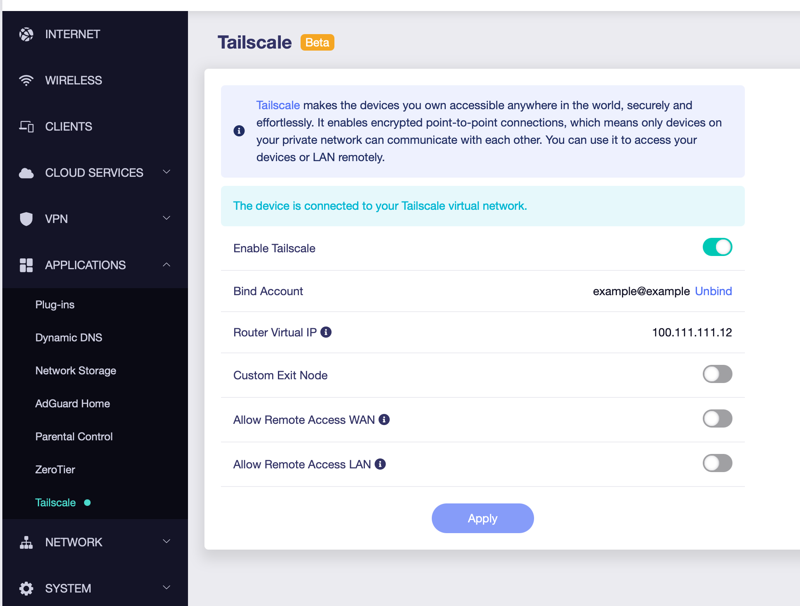
<p>Go to Applications –&gt; Click to Enable Tailscale
Bind your account, it will process for a few minutes and should give you a link. Click on the link THEN run the script above.</p>

<p><img src="/images/tailscale-config.png" alt="Tailscale config menu" /></p>

<p>Now you can use a more up to date version of Tailscale, keep the scripts around because you’ll want to run them peridocially to keep up to date.</p>]]></content><author><name></name></author><category term="tailscale" /><category term="home network" /><category term="wifi" /><category term="router" /><category term="security" /><category term="configuration" /><summary type="html"><![CDATA[I recently picked up the Flint 3 router, running OpenWrt, to replace my aging home networking gear.]]></summary></entry><entry><title type="html">Basic Flint 3 Router Security</title><link href="https://dancocos.com/2025/08/01/GL-Inet-Flint3-Router-Config.html" rel="alternate" type="text/html" title="Basic Flint 3 Router Security" /><published>2025-08-01T05:00:00+00:00</published><updated>2025-08-01T05:00:00+00:00</updated><id>https://dancocos.com/2025/08/01/GL-Inet-Flint3-Router-Config</id><content type="html" xml:base="https://dancocos.com/2025/08/01/GL-Inet-Flint3-Router-Config.html"><![CDATA[<p>I recently picked up the <a href="https://www.gl-inet.com/products/gl-be9300/">Flint 3</a> router, to replace my aging home networking gear. I didn’t find a complete guide to basic configuration I’d deem manditory out of the box.</p>

<p>The GL Inet “basic” interface is on ports 80/443 and the LuCI UI on 8080/8443. They seem to configue the same things just with different interfaces and different levels of details. On to enabling ssh with keys.</p>

<p>Using the LuCI interface you can add keys via the System –&gt; Administraion menu. On the SSH Access tab, I suggest turning OFF</p>

<ul>
  <li>Password authentication</li>
  <li>Allow root logins with password</li>
  <li>Allow the root user to log in with password</li>
</ul>

<p>On the SSH Keys tab you can, unsuprisingly add ssh keys.</p>

<p>On the HTTP(S) Access tab I suggest you enable “Redirect to HTTPS”</p>

<p>Save and apply everything, you should now be able to ssh in with root@hostname</p>

<p>Next up Tailscale and SSL Certs.</p>

<p>Follow the instructions in my post <a href="/2025/08/16/gl-inet-tailscale-setup.html">GL.iNet Tailscale Config</a> before doing anyhing else with Tailscale.</p>

<p>For the basic GL Inet web interface and the Luci interface I run the following commands, of course change gl-be9300.EXAMPLE.ts.net to your host name.</p>

<div class="language-plaintext highlighter-rouge"><div class="highlight"><pre class="highlight"><code>/usr/sbin/tailscale cert gl-be9300.EXAMPLE.ts.net
cp gl-be9300.EXAMPLE.ts.net.crt /etc/nginx/nginx.cer
cp gl-be9300.EXAMPLE.ts.net.key /etc/nginx/nginx.key
service nginx restart
cp gl-be9300.EXAMPLE.ts.net.crt /etc/uhttpd.crt
cp gl-be9300.EXAMPLE.ts.net.key /etc/uhttpd.key
service uhttpd restart
</code></pre></div></div>]]></content><author><name></name></author><category term="home network" /><category term="wifi" /><category term="router" /><category term="security" /><category term="configuration" /><summary type="html"><![CDATA[I recently picked up the Flint 3 router, to replace my aging home networking gear. I didn’t find a complete guide to basic configuration I’d deem manditory out of the box.]]></summary></entry><entry><title type="html">Moving to Mint Mobile from Verizon</title><link href="https://dancocos.com/2025/05/23/Mint-Mobile-from-Verizon.html" rel="alternate" type="text/html" title="Moving to Mint Mobile from Verizon" /><published>2025-05-23T05:00:00+00:00</published><updated>2025-05-23T05:00:00+00:00</updated><id>https://dancocos.com/2025/05/23/Mint-Mobile-from-Verizon</id><content type="html" xml:base="https://dancocos.com/2025/05/23/Mint-Mobile-from-Verizon.html"><![CDATA[<p>A combo of my wife and I giving up our Apple Watches, a horrible experience with Verizon, where I was straight up lied to by several people while trying to get a carrier-subsidized phone, and a friend making fun of me for paying too much. I took the plunge and switched to <a href="http://fbuy.me/u7KEu">Mint Mobile</a>, note this is a referral link.</p>

<p>Everything from setup, to number porting to transfer was pretty easy, and my bill went from ~$200 a month to ~$45. At the max, it could be $60, but I looked at our usage, and I never hit over 15GB and wife 20GB. It includes the two things that are important to me as well: tethering and an option for seamless international travel.</p>

<p>Sure, I can’t get the carrier to subsidize my phone but’s not a big deal as I’ve always just bought my phones outright. It doesn’t take much math to figure out that $2500 a year vs $550 a year leaves a couple grand on the table to put towards a new phone.</p>]]></content><author><name></name></author><category term="mobile" /><category term="corporations" /><category term="suck" /><summary type="html"><![CDATA[A combo of my wife and I giving up our Apple Watches, a horrible experience with Verizon, where I was straight up lied to by several people while trying to get a carrier-subsidized phone, and a friend making fun of me for paying too much. I took the plunge and switched to Mint Mobile, note this is a referral link.]]></summary></entry><entry><title type="html">Jellyfin SSL Tailscale</title><link href="https://dancocos.com/2025/02/02/jellyfin-ssl-tailscale.html" rel="alternate" type="text/html" title="Jellyfin SSL Tailscale" /><published>2025-02-02T05:00:00+00:00</published><updated>2025-02-02T05:00:00+00:00</updated><id>https://dancocos.com/2025/02/02/jellyfin-ssl-tailscale</id><content type="html" xml:base="https://dancocos.com/2025/02/02/jellyfin-ssl-tailscale.html"><![CDATA[<p>I recently setup <a href="https://jellyfin.org">Jellyfin</a> on an Ubuntu box at home. I wanted to use SSL certs and <a href="https://tailscale.com">Tailscale</a> for the web interface.</p>

<p>You’ll need to create a cert in pfx/pkcs12 format</p>

<p>Replace the servername with yours I put mine in a script</p>
<div class="language-plaintext highlighter-rouge"><div class="highlight"><pre class="highlight"><code>#!/bin/bash
cd /root
/usr/bin/tailscale cert server.example-example.ts.net
openssl pkcs12 -export -inkey /root/server.example-example.ts.net.key  -in /root/server.example-example.ts.net.crt  -out /etc/jellyfin/server.example-example.ts.net.pfx  -passout pass:
chmod 755 /etc/jellyfin/server.example-example.ts.net.pfx
service jellyfin restart
</code></pre></div></div>

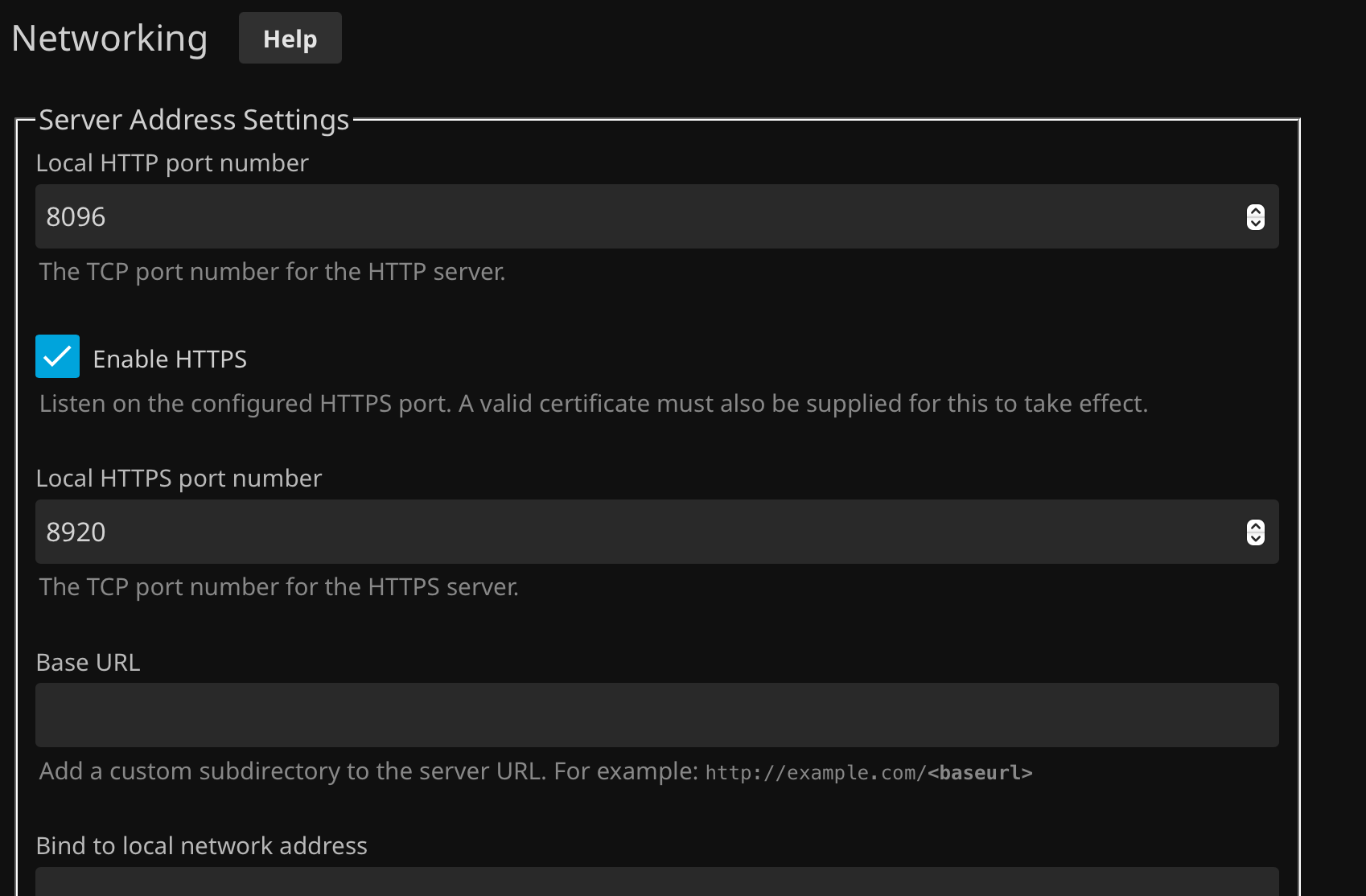
<p>Then enable https
<img src="/images/jf-https.png" alt="Enable https" /></p>

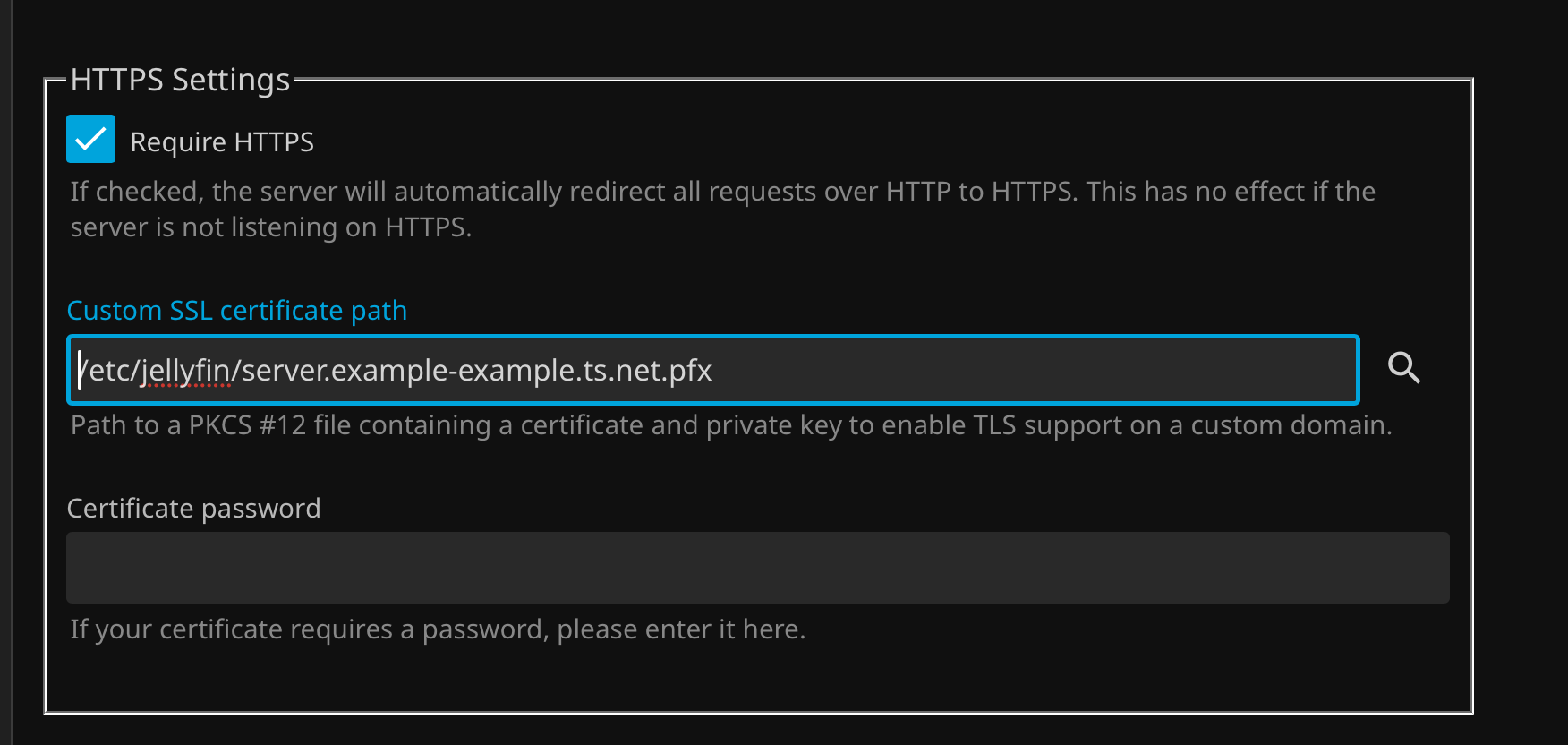
<p>Once you’ve verirfied everything works you can force https
<img src="/images/jf-https-example.png" alt="Require https" /></p>]]></content><author><name></name></author><category term="home" /><category term="jellyfin" /><category term="scripts" /><summary type="html"><![CDATA[I recently setup Jellyfin on an Ubuntu box at home. I wanted to use SSL certs and Tailscale for the web interface.]]></summary></entry><entry><title type="html">Avoid Tracking - Best Bang for Your Buck</title><link href="https://dancocos.com/2025/02/02/Best-Bang-for-Your-Avoiding-Tracking-Buck.html" rel="alternate" type="text/html" title="Avoid Tracking - Best Bang for Your Buck" /><published>2025-02-02T05:00:00+00:00</published><updated>2025-02-02T05:00:00+00:00</updated><id>https://dancocos.com/2025/02/02/Best-Bang-for-Your-Avoiding-Tracking-Buck</id><content type="html" xml:base="https://dancocos.com/2025/02/02/Best-Bang-for-Your-Avoiding-Tracking-Buck.html"><![CDATA[<p>With all of the changes, aka the 💩 show going on in the US right now, a few people have reached out asking how to be more secure online and avoid tracking. They usually start off with “What VPN should I use?”</p>

<p>The money spent by VPN companies on marketing appears to have worked, people think that using a VPN will protect their privacy online and that obscuring their IP address will somehow make them secure. They also seem to imply that doing so will block cookies as evidenced by an ad I saw on the Metro.</p>

<p><img src="/images/cookies-ad.png" alt="Cookies online are not blocked by a VPN" /></p>

<p>This is not to say that the VPNs don’t serve a purpose and that they aren’t good, hell I pay for a Mullvad subscription. These are broad generalizations but close enough for the general public to understand what VPNs do.</p>

<h2 id="work">Work</h2>
<p>Workplaces will often have your computer connect via a VPN. This covers four things.</p>

<ul>
  <li>
    <p>Puts all of your traffic through a secure tunnel to a server controlled by your job.</p>
  </li>
  <li>
    <p>Helps to insure that if you use an insecure protocol someone at the cafe can’t snoop on your traffic.</p>
  </li>
  <li>
    <p>Usually has the benefit of forcing you to use their DNS which will let you find internal servers.</p>
  </li>
  <li>
    <p>Lastly it allows them to control and see where you go online. This isn’t really bad per se it’s their computer they control it.</p>
  </li>
</ul>

<h2 id="home">Home</h2>
<p>Using a VPN at home (or from a cafe) does the following. This makes a few assumptions again but is generally true.</p>

<ul>
  <li>
    <p>Funnels all of your traffic via a tunnel to the VPN sever, this hides where you are going from the cafe.</p>
  </li>
  <li>
    <p>Usually you can chose the VPN exit location. This means you can use an IP address in another location. A common example is saying you’re in the US to watch localized Hulu.</p>
  </li>
  <li>
    <p>Make you appear to the sites you are visiting that you are coming from a different location.</p>
  </li>
</ul>

<blockquote>
  <p>The tl;dr for VPNs it that you can appear to be calling from another place and share resources with other devices on your VPN but it doesn’t really block tracking.</p>
</blockquote>

<h2 id="how-i-block-ads-at-the-dns-level">How I Block Ads at the DNS Level</h2>

<p>The VPN doesn’t really stop companies from tracking you, you’re basically spoofing the caller id but when someone picks up the line on the other side you’re still saying “Hi, I’m Dan how are you doing?” If you want to stop this type of tracking, usually done through cookies, you can mitigate a LOT of this via ad blockers. There are several browser plugins that can block ads and those work pretty well, but I prefer to nip to the problem in the bud by blocking ads at the DNS level.</p>

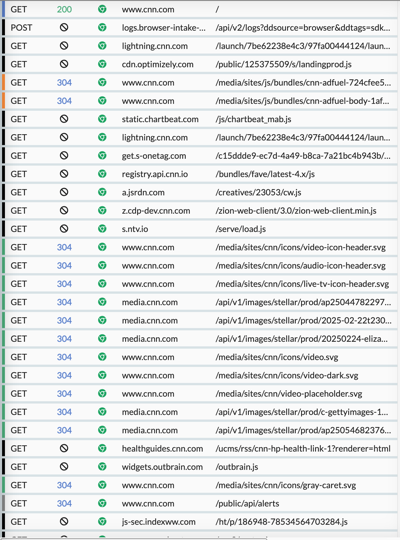
<p>When you load a web page it make a series of calls to multiple servers. I’m using CNN as an example but this is how most modern web pages work so there isn’t anything particularly nefarious about what CNN is doing.</p>

<p><img src="/images/cnn-loading.png" alt="CNN Loading page" /></p>

<p>I used <a href="https://httptoolkit.com/">HTTP Toolkit</a> to gather all of the requests if you look you can see the initial request, GET, for www.cnn.com with the <a href="https://en.wikipedia.org/wiki/List_of_HTTP_status_codes#2xx_success">status 200</a> which means “OK” Let’s skip down and look at one of the GETs with a 🚫 icon. My snooping tool tells me me this about my request for <code class="language-plaintext highlighter-rouge">https://get.s-onetag.com/c15ddde9-ec7d-4a49-b8ca-7a21bc4b943b/tag.min.js</code></p>

<blockquote>
  <p>The upstream server hostname could be not found, so HTTP Toolkit did not forward the request.
This typically means the host doesn’t exist, although it could be an issue with your DNS or network configuration.</p>
</blockquote>

<p>This means that when it tried to look up the server using DNS (what translates names to IPs) that it came back empty. I wouldn’t call this an “issue” with my DNS or network configuration but instead a feature. I use the software tool <a href="https://pi-hole.net">Pi-hole</a> to lookup my DNS requests. Pi-hole maintains a list of servers that are specifically used for ad-tracking and when requested tells my browser “nope that doens’t exist” This is very effective in cutting down tracking because requests to share your info are not able to phone home.</p>

<p>How pervasive is this you may ask? Of the 60 requests my browser made to request the page 40 of them were to tracking services.  (╯°□°）╯︵ ┻━┻)</p>

<p>Why do I prefer DNS blocking vs browser ad blocking you may ask? Well because it not only works in my browser, but in my email, on the devices I use around the house including things you never really think about, like your TV.</p>

<p>What are the downsides blocking ads on the DNS level? It will sometimes break things, you can make exceptions for those sites you want to report back to or in the case of Pi-hole temporarily disable the blocker for a while to see if it is even problem.  Some sites can detect that you’re blocking ads and will show you a popup. Sometimes it will let you through trying to guilt you into unblocking their site and other times it won’t. ¯_(ツ)_/¯</p>

<p><img src="/images/imgur-admiral.png" alt="Imgur add blocking modal" /></p>

<p>I realize not everyone has the desire or skills to run a Pi-hole what can they do? There are services that offer similar functionality to a Pi-hole. One of them that a lot of people recommend is <a href="https://nextdns.io">NextDNS</a> I’ve not personally used them nor am I getting paid or a referral bonus to recommend them but they have a free tier you can try and the paid tier is $19.90 a year.</p>

<p>Does this mean you can’t be tracked online all together? Not really the EFF’s <a href="https://coveryourtracks.eff.org">Cover Your Tracks</a> will give you a better idea of what’s going on.</p>

<p>Have questions or is something I said blatantly wrong shoot me an email.</p>]]></content><author><name></name></author><category term="advice" /><category term="laity" /><category term="explainer" /><category term="privacy" /><category term="security" /><summary type="html"><![CDATA[With all of the changes, aka the 💩 show going on in the US right now, a few people have reached out asking how to be more secure online and avoid tracking. They usually start off with “What VPN should I use?”]]></summary></entry><entry><title type="html">DOIO KB 16 aka Megalodon Triple Knob Macropad Setup and Review</title><link href="https://dancocos.com/2024/12/27/DOIO-kb-16.html" rel="alternate" type="text/html" title="DOIO KB 16 aka Megalodon Triple Knob Macropad Setup and Review" /><published>2024-12-27T05:00:00+00:00</published><updated>2024-12-27T05:00:00+00:00</updated><id>https://dancocos.com/2024/12/27/DOIO-kb-16</id><content type="html" xml:base="https://dancocos.com/2024/12/27/DOIO-kb-16.html"><![CDATA[<p>I was lucky enough to receive a <a href="https://www.keebmonkey.com/products/megalodon-triple-knob-macro-pad?_pos=1&amp;_psq=mega&amp;_ss=e&amp;_v=1.0">Megalodon Triple Knob Macropad</a> for Xmas from my brother in law. I was excited to set it up and start using it but information was more difficult to find than I had hoped and what I did find were mostly product reviews. Here is what I’ve learned from a day or two of using it with macOS.  There may be finer points that I missed so feel free to email me or comment on <a href="https://discuss.systems/@dancocos/113749369299196279">my post</a> to give any advice or correct any errors.</p>

<p>I use <a href="https://karabiner-elements.pqrs.org">Karabiner Elements</a> with my <a href="https://www.keychron.com/products/keychron-k6-wireless-mechanical-keyboard">Keychron K6</a> and I’ve been happy with it so I was hoping to tack on to that and not need to run another app. All roads and the suggestion from the manufacturer lead to VIA.</p>

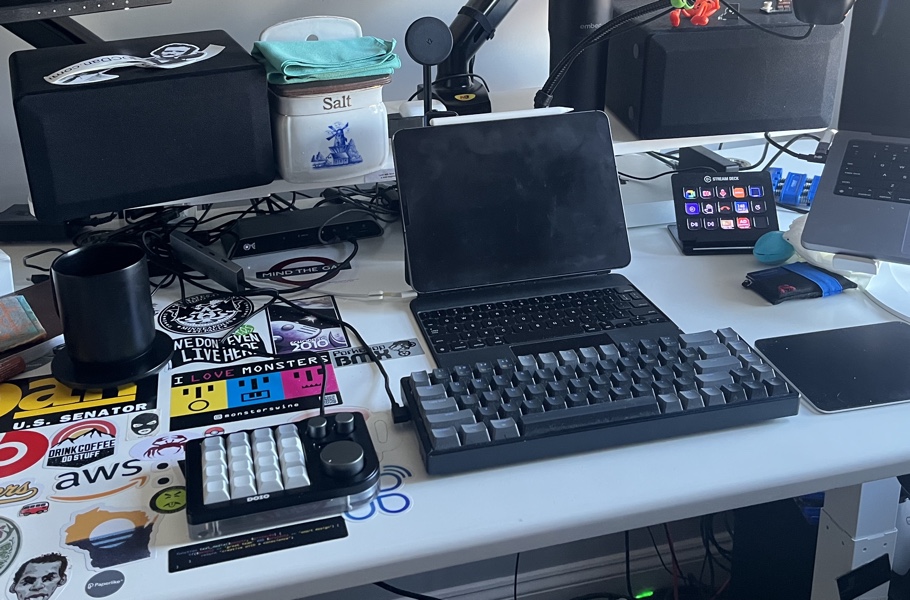
<p><img src="/images/kb_16.jpeg" alt="The Device in question" /></p>

<h4 id="using-via">Using VIA</h4>

<p>There are two ways to use VIA to configure your keyboard. You can use it in the browser <a href="https://usevia.app/">Use VIA</a> or you can grab the release from <a href="https://github.com/the-via/releases/releases">Github</a>.</p>

<p>The VIA app doesn’t run in the background like KE. It simply configures your device and going forward you no longer need to run the app, once I had this epiphany I was pleasantly surprised. The app just configures key mappings and macros for your HID profile for the device. This has some advantages, the main one being you can move it from machine to machine and not have to worry about installing the software on each machine and keeping the configs up to date everywhere since the config is on the device. The disadvantage and where this differs from something like the <a href="https://www.elgato.com/us/en/p/stream-deck-mk2-black">Stream Deck</a> is that you cannot have direct application integration via the background app. For example the Stream Deck can call scripts running locally on my computer or poll the CPU. (You probably could create some very fragile macro but meh) This led to some initial disappointment as one of the things I really wanted to use it for was to launch apps or browsers directly to a URL from the buttons.</p>

<p><img src="/images/so_many_inputs.jpeg" alt="So many inputs" /></p>

<h4 id="enter-macos-shortcuts">Enter macOS Shortcuts</h4>

<p>macOS has a feature “Shortcuts” you can pretty easily create shortcuts which can interact with most apps8 running on your computer. For example I wanted to map a key launch a browser that opens my company’s help desk. It’s simple enough to do with shortcuts. The next step is to assign a key mapping to that shortcut. It’s pretty to make a key combo that you’ll never likely use <code class="language-plaintext highlighter-rouge">&lt;control&gt;+&lt;option&gt;+&lt;command&gt;+h</code> for example. This is a very basic example as you can create very complex Shortcuts depending on your needs. This combined with <a href="https://choosy.app">Choosy</a> is pretty powerful. *I’ll have to write up something for Choosy later.</p>]]></content><author><name></name></author><category term="home" /><category term="desk" /><category term="setup" /><category term="keyboards" /><summary type="html"><![CDATA[I was lucky enough to receive a Megalodon Triple Knob Macropad for Xmas from my brother in law. I was excited to set it up and start using it but information was more difficult to find than I had hoped and what I did find were mostly product reviews. Here is what I’ve learned from a day or two of using it with macOS. There may be finer points that I missed so feel free to email me or comment on my post to give any advice or correct any errors.]]></summary></entry></feed>