Browser Profiles for Fun and Profit
There are a handful of browser extensions that will give you cash back when you make purchases. The trade-off is that the extension follows you around the web all day, tracking your every move, not what I really want. Add into this that I use a Pi-hole that has pretty aggressive ad blocking turned on, and it breaks a lot of things.
What I tried
- Chrome Profiles didn’t work because while you can have the browser source DNS from a different source, this changes it across all profiles.
- Safari “Put App in the Dock” (not sure of the official name) didn’t work because you lose the URL bar.
Solution
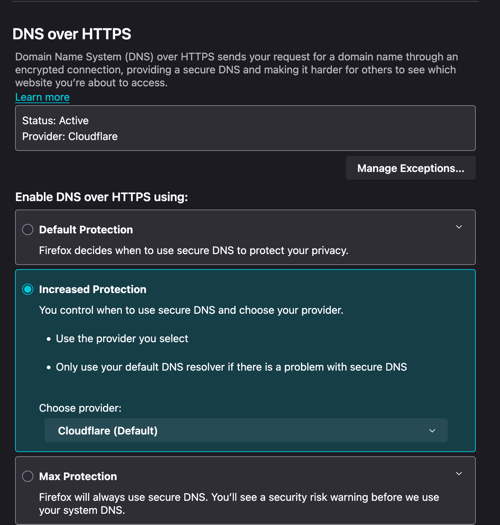
Firefox profiles allow you to set DNS lookups per profile, so I have one named “Shopping” that has the shopping extensions installed and uses Cloudflare DNS, and when I want to buy something online, I use that browser to get the cashback while avoiding tracking and having to disable add blocking on the Pi-hole. The only problem I’ve noticed so far is that Apple Pay is hit or miss.
To set it up in Firefox put about:preferences#privacy in the URL bar. Scroll down to DNS over HTTPS, select “Increased Protection” and chose a provider.