Tailscale Service Jellyfin Proxy
If you want to securely watch video content served by Jellyfish over a Tailscale machine read on.
If it isn’t clear already I love Tailscale I setup a Jellyfin server on my home network, read about setting up ssl, the server running Jellyfin has a few other services running as well so Jellyfin is on port 8920 it’s annoying to have add a port to a URL and when serving up “family videos” to friends and family it’s a step beyond what they would think is reasonable. In comes Tailscale services.
First create a tag for this service. I named mine “jellyfin” you can assign a Tag Owner and description if you’d like.
Next define a service. I also named this “jellyfin” this name is what how you’ll access it in your browser https://jellyfin.name-example.ts.net/
Note the port should be 443 this is the port the TS service uses NOT the port you’re serving on your instance.
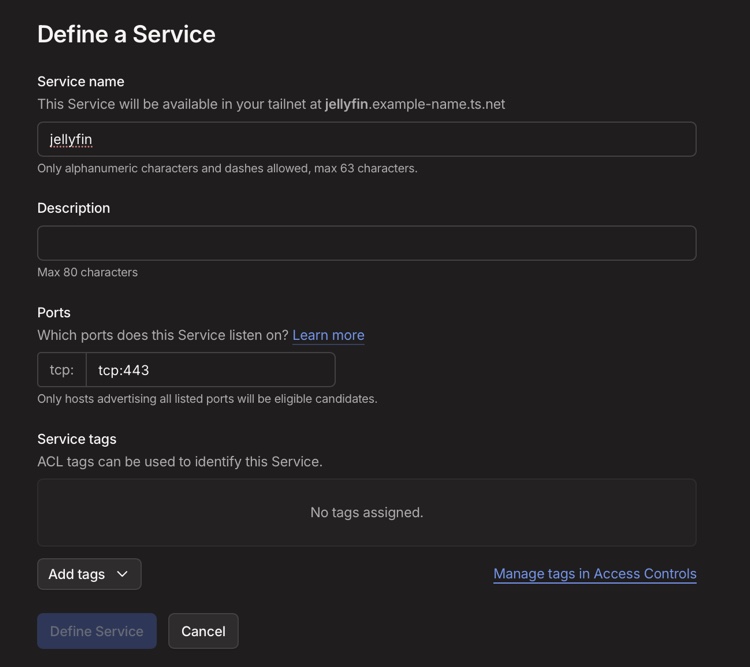
Add the tag jellyfin as well.
Also add the tag jellyfin to the machine.
Now ssh into the instance running jellyfin sudo -i and run the following
tailscale serve --service=svc:jellyfin -https=443 https://myserver.example-name.ts.net:8920
You should see something like this:
root@myserver:~# tailscale serve --service=svc:jellyfin -https=443 https://myserver.example-name.ts.net:8920
Available within your tailnet:

https://jellyfin.example-name.ts.net/
|-- proxy https://myserver.example-name.ts.net:8920

Serve started and running in the background.
To disable the proxy, run: tailscale serve --service=svc:jellyfin --https=443 off
To remove config for the service, run: tailscale serve clear svc:jellyfin
Open a browser and go to https://jellyfin.example-name.ts.net/ all done.